How to set up an Action to prompt for follow-up Actions
Info
When the first Action is run, a pop-out window will open with a list of actions that can be run as-well.
Open the Action Library
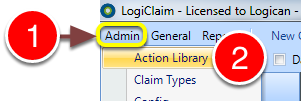
1: Click Admin from the menu.
2: Select Action Library from the drop-down menu – the Action Library will open.
Open the required Action setup window
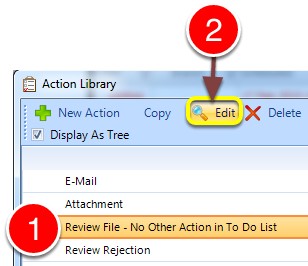
1: Select the required Action from the list.
2: Click Edit – the edit Action window will open.
Add follow up Actions
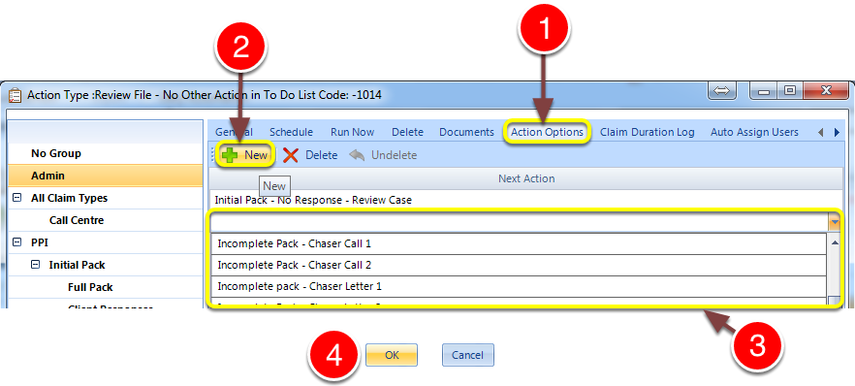
1: Click the Action Options tab – the Action Options window will open.
2: Click the New button – a new entry will be added.
3: Select the required follow on Action from the list.
4: Click OK to save and close the window.
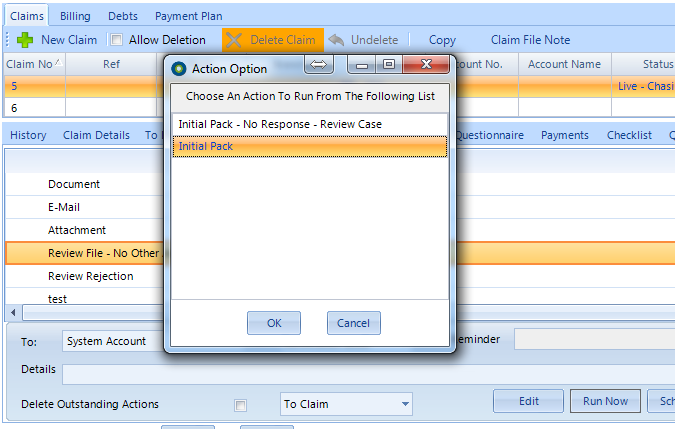
Introduced in version number 2015.4.16.1398