How to set visual flags for Status Boxes on a claim
Open Config Window
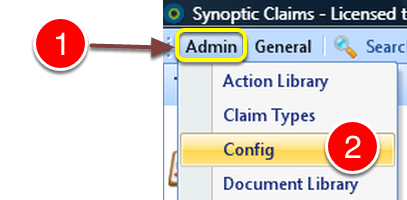
1: Click Admin on the Menu.
2: Select Config from the drop down list – The Config window will open.
Open State Buttons Window
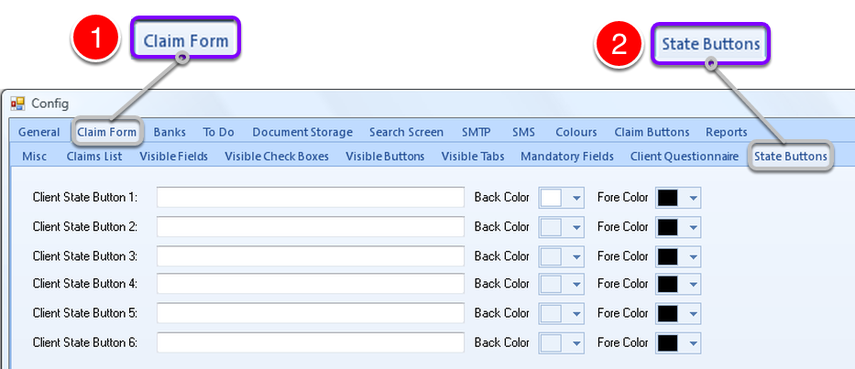
1: Click the Claim Form tab.
2: Click the State Button tab – the State Button window will open.
Create State Button
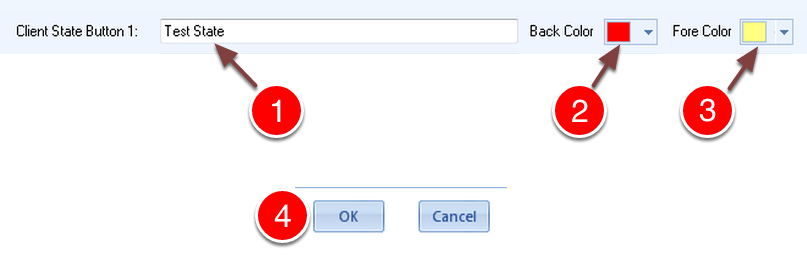
1: Type a description for the state button.
2: Select a Background Colour for the State Button.
3: Select a Text Colour for the State Button.
4: Click OK to save and close the window.
Using the State Button
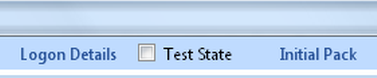
In a claim, the new button appears along the top menu bar.

When Ticked the state button shows in the colours selected in the setup.