How to set up Stage Groups to show in the To Do list.
Open the Status List Menu
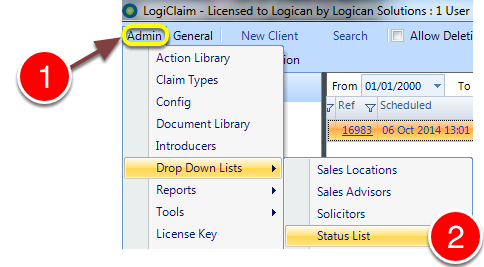
1: Click Admin from the Menu.
2: Select Drop Down Lists –> Status List – the status List window will open.
Choose which Status requires editing
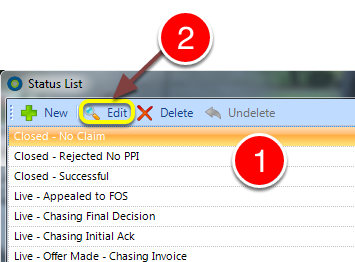
1: Click on the Status you require to change.
2: Click Edit – the Status’s window will open.
Choose as which Status Group this Status should display in the main To Do list.
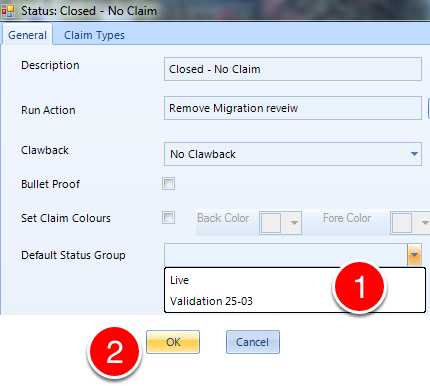
1: Select to which Group this status should belong for the To Do list.
2: Click OK to save and close the Status window.
Open the Config menu
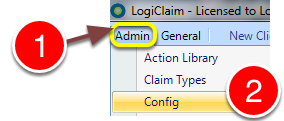
1: Click Admin from the Menu.
2: Select Config from the drop-down mwnu – the Config window will open.
Change the Setting
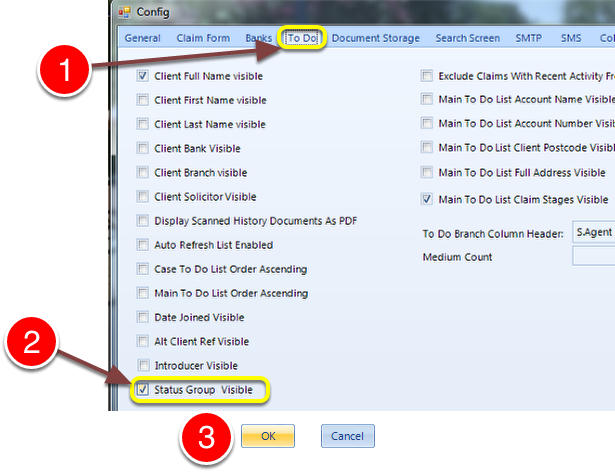
1: Click on the To Do tab – the To Do config window will open.
2: Tick/untick the Status Group Visible tick-box.
3: Click OK to save the settings and close the Config window.