Skip to content
  • LogiClaim
  • LogiPro
  • LogiPay
  1. LogiClaim
  2. LogiClaim - Full User Manual
  3. Scanning
  4. Scan by ClientClaim ID
LogiClaim - Full User Manual
  • Getting Started
  • Creating Documents
  • Action Library
  • Search
  • Claims
  • Claim Stages
  • Client Statuses
  • Admin - Claim Types
  • Admin - Config
  • Admin - Drop Down Lists
  • Admin - Introducer
  • Admin - Report Builder
  • Admin - Tools
  • Admin - Users
  • Scanning
    • How to Scan a Document
    • How to Attach a Scanned Document to a Claim
    • How to Scan a Signature
    • How to create a divider page so that scans are seperated
    • How to ignore blank pages when scanning in duplex mode
    • How to Print a Barcode on a letter and automatically attach it back to the Claim when Scanning
    • Scan by ClientClaim ID
    • Friendly Naming of Documents
    • Using Signatures in a Document
  • General
  • Printing
  • Payments
  • Create Questionnaires
  • Ultra-Dialler
  • Misc
  • To Do List
  • Portal
  • Where is the Data Found?
  • GDPR

Scan by ClientClaim ID

This feature enables you to scan an attachment by the ClientClaim ID so the document will attach to the correct client and claim.

Config

Click Admin > Config > General > tick Barcode Contains ClientClaimID instead of ClaimId > OK.
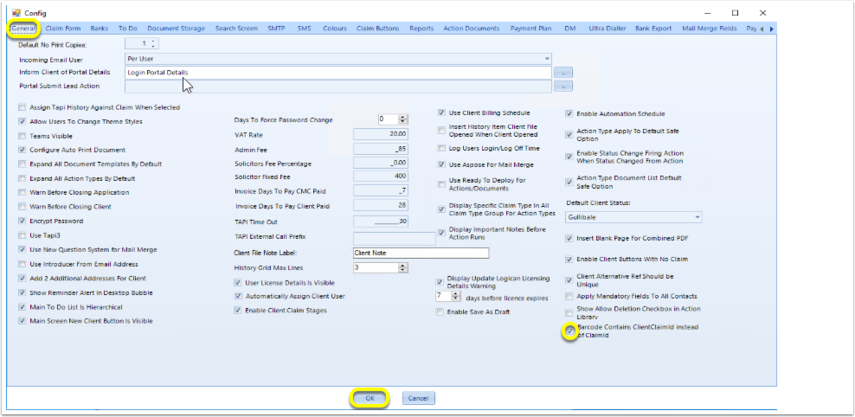
Introduced in Version 2018.11.4.5306 released on 8/11/2018.

© 2026 Logican Solutions

support@logican.co.uk ยท logican.co.uk