Skip to content
  • LogiClaim
  • LogiPro
  • LogiPay
  1. LogiClaim
  2. LogiClaim - Full User Manual
  3. To Do List
  4. How to Show Date of Birth on the main To Do list
LogiClaim - Full User Manual
  • Getting Started
  • Creating Documents
  • Action Library
  • Search
  • Claims
  • Claim Stages
  • Client Statuses
  • Admin - Claim Types
  • Admin - Config
  • Admin - Drop Down Lists
  • Admin - Introducer
  • Admin - Report Builder
  • Admin - Tools
  • Admin - Users
  • Scanning
  • General
  • Printing
  • Payments
  • Create Questionnaires
  • Ultra-Dialler
  • Misc
  • To Do List
    • How to open the To Do List
    • How to change the visible columns in the To Do list
    • How to filter items to view in a To Do list
    • How to Delete Items from the To Do List
    • How to sort the To Do list
    • Main To Do List Is Hierarchical
    • How to Schedule a review on all Live Claims with no To Do's
    • How to Show Total Claims on the main To Do list
    • How to Show Product Type on the main To Do list
    • How to Show Date of Birth on the main To Do list
  • Portal
  • Where is the Data Found?
  • GDPR

How to Show Date of Birth on the main To Do list

Open the Config
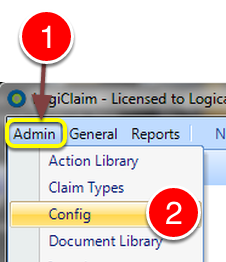
Open the Config

  1. Click Admin from the Menu.
  2. Select Config from the drop down list – the Config window will open.

Change the required setting
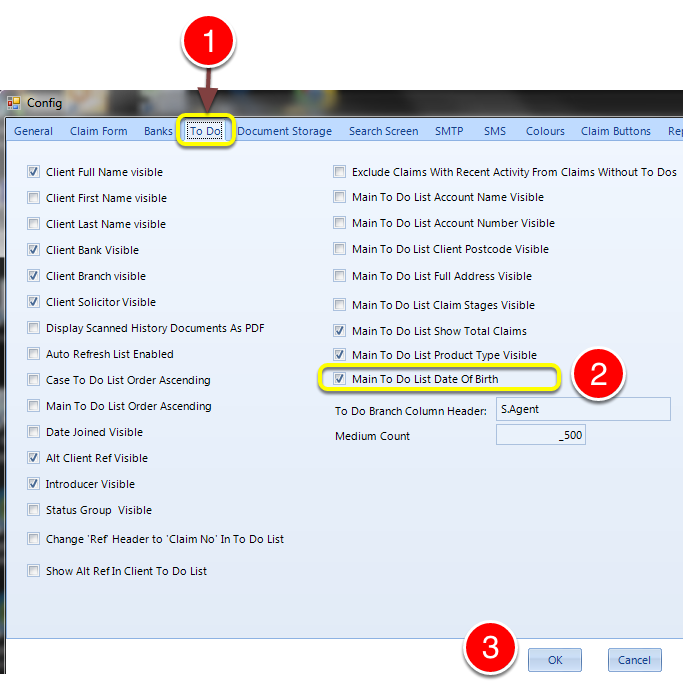
Change the required setting

  1. Select the To Do tab – the To Do window will open.
  2. Tick the Main To Do List Date of Birth to show the Date of Birth, or untick to hide this column.
  3. Click OK to save the data and close the window.

Introduced in version number 2015.8.7.1847 – 12/08/2015

© 2026 Logican Solutions

support@logican.co.uk ยท logican.co.uk