Skip to content
  • LogiClaim
  • LogiPro
  • LogiPay
  1. LogiClaim
  2. LogiClaim - Full User Manual
  3. To Do List
  4. How to sort the To Do list
LogiClaim - Full User Manual
  • Getting Started
  • Creating Documents
  • Action Library
  • Search
  • Claims
  • Claim Stages
  • Client Statuses
  • Admin - Claim Types
  • Admin - Config
  • Admin - Drop Down Lists
  • Admin - Introducer
  • Admin - Report Builder
  • Admin - Tools
  • Admin - Users
  • Scanning
  • General
  • Printing
  • Payments
  • Create Questionnaires
  • Ultra-Dialler
  • Misc
  • To Do List
    • How to open the To Do List
    • How to change the visible columns in the To Do list
    • How to filter items to view in a To Do list
    • How to Delete Items from the To Do List
    • How to sort the To Do list
    • Main To Do List Is Hierarchical
    • How to Schedule a review on all Live Claims with no To Do's
    • How to Show Total Claims on the main To Do list
    • How to Show Product Type on the main To Do list
    • How to Show Date of Birth on the main To Do list
  • Portal
  • Where is the Data Found?
  • GDPR

How to sort the To Do list

Open the To Do list
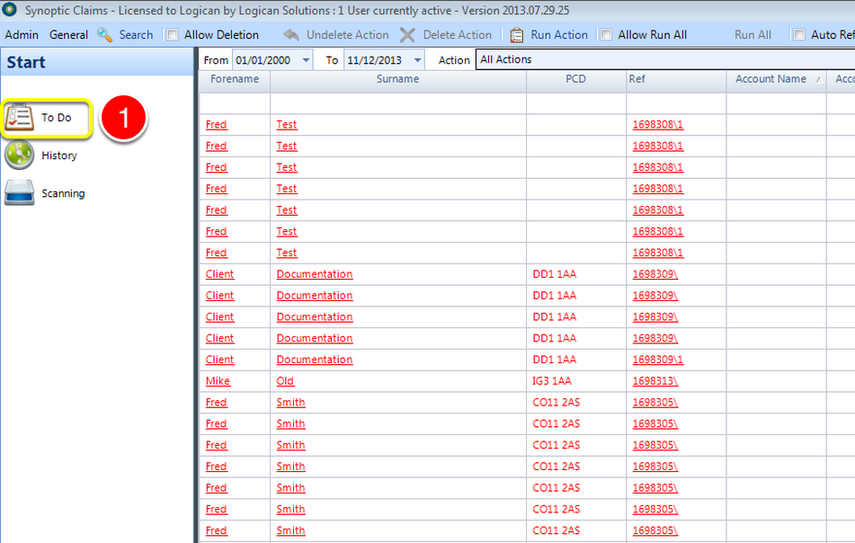
Open the To Do list

1: Click the To Do button on the Side Menu – the To Do list will open.

Click on a heading
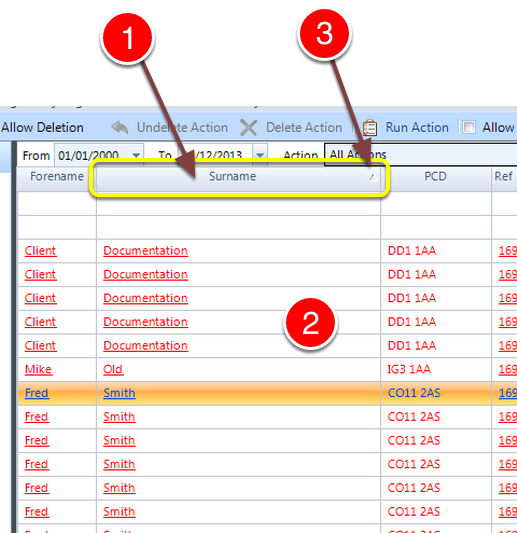
Click on a heading

1: Clicking on a heading will sort the list by the data in the column.

2: The list will be reordered and displayed.

3: An arrow will show in the heading to show that is the column that is the primary sort order.

Note: Clicking the same header again will reverse the sort order.

© 2026 Logican Solutions

support@logican.co.uk ยท logican.co.uk