How to set up a Payment Plan
Open a Claim
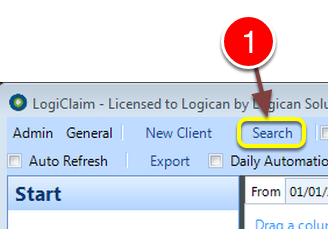
1: Click Search from the Menu – the Search window will open.
Select the required Claim
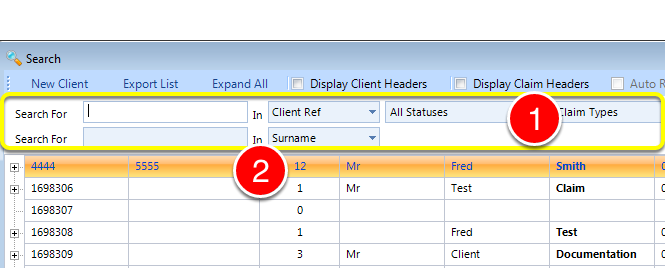
1: If required enter some search criteria or just Enter for all.
2: Double click on the required Claim – the Claim window will open.
Add the Plan details
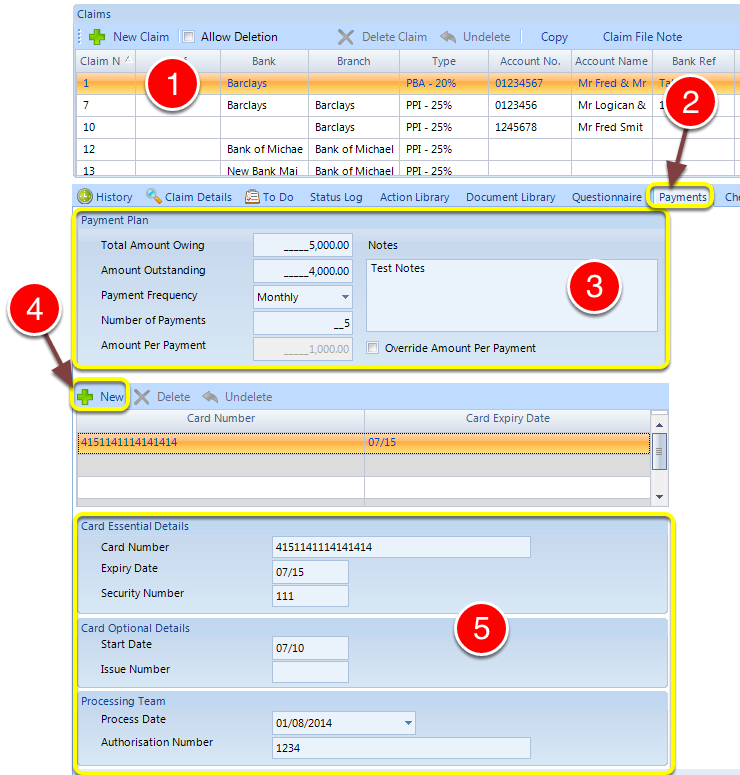
1: Select the required Claim.
2: Click the Payments tab – the Payments window will open.
3: Complete the Payment plan details.
4: To add a new Credit Card, Click New.
5: Complete the Credit Card details.
Mailmerge Fields for Documents
Client ID: «PaymentClientID»
Payment ID: «PaymentID»
Original Amount: «PaymentTotalAmountOwing»
Outstanding: «PaymentAmountOutstanding»
Payment Frequency: «PaymentPaymentFrequency»
Number of Payments: «PaymentNumberOfPayments»
Payment amount: «PaymentAmountPerPayment»
Payment Active: «Paymentactive»
Notes: «PaymentNotes»
Payment Override: «PaymentAllowAmountPerPaymentOverride»