Skip to content
  • LogiClaim
  • LogiPro
  • LogiPay
  1. LogiClaim
  2. LogiClaim - Full User Manual
  3. Payments
  4. Limit Payment type options
LogiClaim - Full User Manual
  • Getting Started
  • Creating Documents
  • Action Library
  • Search
  • Claims
  • Claim Stages
  • Client Statuses
  • Admin - Claim Types
  • Admin - Config
  • Admin - Drop Down Lists
  • Admin - Introducer
  • Admin - Report Builder
  • Admin - Tools
  • Admin - Users
  • Scanning
  • General
  • Printing
  • Payments
    • How to enable the part payment Billing module
    • How to record and Allocate part payments
    • Creating a Payment Schedule
    • Enabling Payment Gateway
    • Permission to Add Payments
    • Limit Payment type options
    • Creating Repeat Card Payment Schedules
    • Making a single card payment
    • Create Multiple Invoices
    • Add a Surcharge to Bill when Receiving a Card Payment
    • Capture BACS/Cheque Numbers
  • Create Questionnaires
  • Ultra-Dialler
  • Misc
  • To Do List
  • Portal
  • Where is the Data Found?
  • GDPR

Limit Payment type options

Open Config
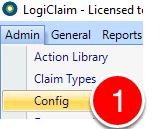
Open Config

1. Click Admin | Config in the menu – the Config window will open.

Change the setting
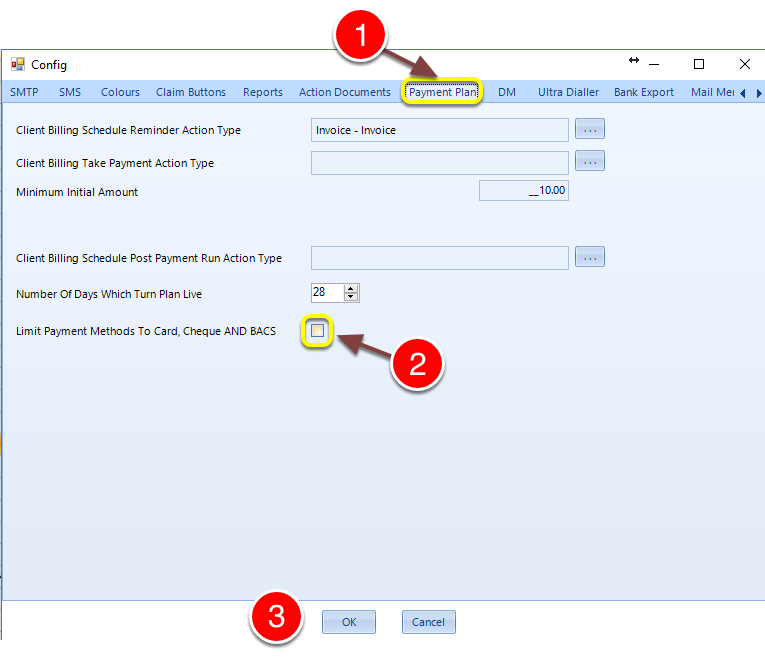
Change the setting

1. Click on the Payment Plan tab.

2. Un/tick the Limit Payment Methods to Card, Cheque and BACS checkbox.

Introduced in version 2016.2.1.2369

© 2026 Logican Solutions

support@logican.co.uk ยท logican.co.uk