Skip to content
  • LogiClaim
  • LogiPro
  • LogiPay
  1. LogiPro
  2. LogiPro - Full User Manual
  3. Manage Owner's Properties
  4. Filter the Invoice List
LogiPro - Full User Manual
  • Introduction
  • General Settings
  • Admin
  • Property Management
  • Accounting
  • Banking
  • Invoices
  • Payments
  • VAT
  • Distributions
  • Service Charge
  • Job Management
  • Documents
  • Reports
  • Actions
  • Manage Owner's Properties
    • Introduction
    • Set the Management Fee
    • Set the Client Account and Managing Company
    • Configure the Owner's Company Accounts
    • Set the Management Fee Rates
    • Charge Management Fees for the Property's Expenses
    • Charge the Management Fee for the Property's Rent
    • Filter the Invoice List
    • Monitor the Central Rental Account Activity
    • Statement of Account Report for an Owner's Property
    • Display Client Account Transfers in the Management Company's Reconciliation

Filter the Invoice List

Info

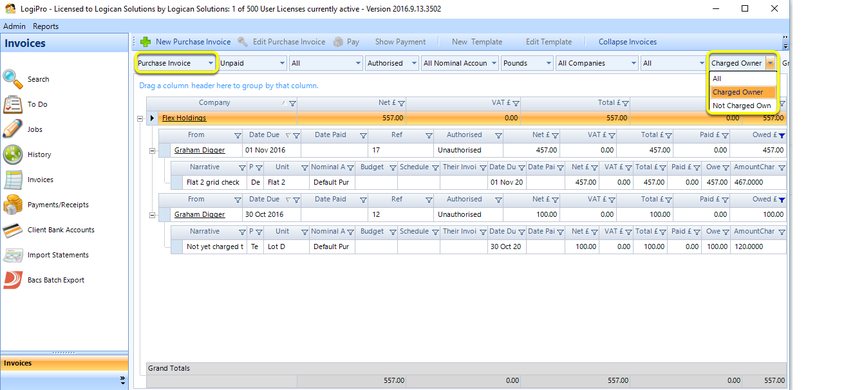
This feature enables you to view the Invoice list by All, Charged Owner or Not Charged Owner.

Click Invoices > Purchase Invoice.

Toggle the filter as required.
© 2026 Logican Solutions

support@logican.co.uk ยท logican.co.uk