How to set questionnaire answers as Currency
Open the Claim Types window
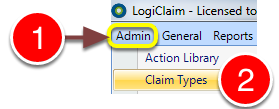
1: Click Admin from the Menu.
2: Select Claim Types from the drop-down menu – the Claim Types window will open.
Open the required Claim Type’s window
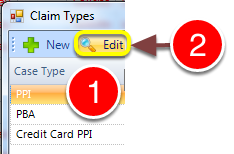
1: Select the required Claim Type from the list.
2: Click Edit – the Claim type’s window will open.
Change Question Type
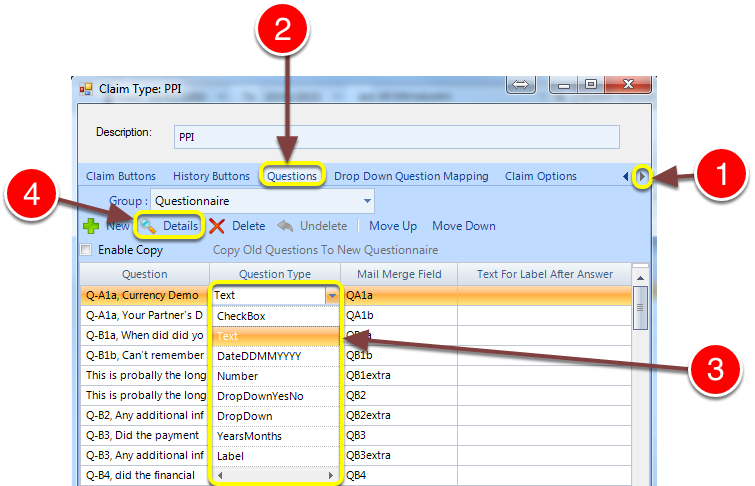
1: Click on the arrow to scroll right, until the Questions tab is visible.
2: Click the Questions tab – the Questions window will open.
3: Select Text as the Question Type from the required Question’s drop-down list.
4: Click Details – the Question Details window will open.
Set as Currency
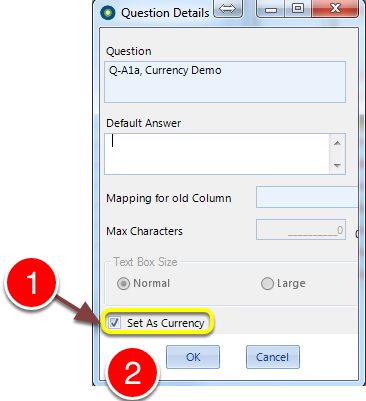
1: Tick the Set As Currency check-box.
2: Click OK to save the setting and close the window.