Skip to content
  • LogiClaim
  • LogiPro
  • LogiPay
  1. LogiClaim
  2. LogiClaim - Full User Manual
  3. General
  4. How to Search the Bank List
LogiClaim - Full User Manual
  • Getting Started
  • Creating Documents
  • Action Library
  • Search
  • Claims
  • Claim Stages
  • Client Statuses
  • Admin - Claim Types
  • Admin - Config
  • Admin - Drop Down Lists
  • Admin - Introducer
  • Admin - Report Builder
  • Admin - Tools
  • Admin - Users
  • Scanning
  • General
    • How to move an Email from claim to another
    • Add, Edit or Delete Banks Main Office information
    • How to Add/Edit a 2nd Address to a Bank Main Office
    • How to Add, Edit or Delete a Bank Branch
    • How do I Reassign An Action
    • How to view claims based on changes in Status over a Date Range
    • How to view the Introducer and Sales Performance Report
    • How to filter the history of a client
    • How to use the new User Performance And Workload Report
    • How to Run the Claims with Action Type Report
    • How to Export Claim Attachments
    • How to Search the Bank List
    • How to run the Action with Follow On Action Report
    • How to Run the Payments List Report
    • How to toggle 'Search as you Type' in Address finder
    • How to Attach Scanned Items to a client's history
    • Enable Alternate Email Field
    • Edit Claim Label Text
    • Date Joined Visibility Permission
    • Using Keyword Rules in SMS Correspondence with a Client
  • Printing
  • Payments
  • Create Questionnaires
  • Ultra-Dialler
  • Misc
  • To Do List
  • Portal
  • Where is the Data Found?
  • GDPR

How to Search the Bank List

Open the Bank List
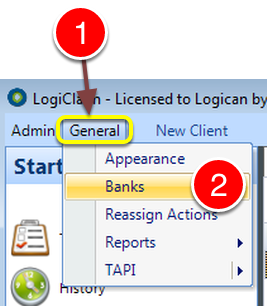
Open the Bank List

1: Click General from the Menu.

2: Select Banks from the drop down list – the Banks window will open.

Perform the Search
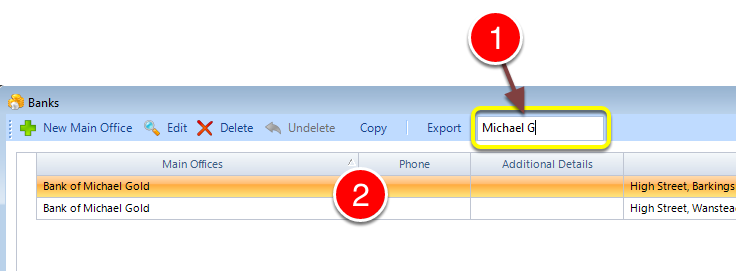
Perform the Search

1: Type part of the name of the required Bank.

2: The list will be filtered.

© 2026 Logican Solutions

support@logican.co.uk ยท logican.co.uk