Setting Company Holidays for Dialler
Info
Once company holidays have been set, it will not be possible to set callback actions for these days
Enable Editing of Holidays for a User
Open the Users Window
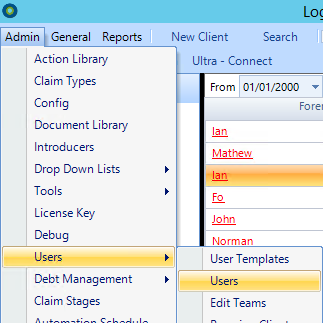
Open the Required User
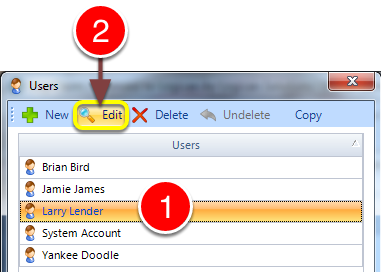
1: Select the required User from the list.
2: Click Edit - the User's window will open.
Change Holiday Change Permission
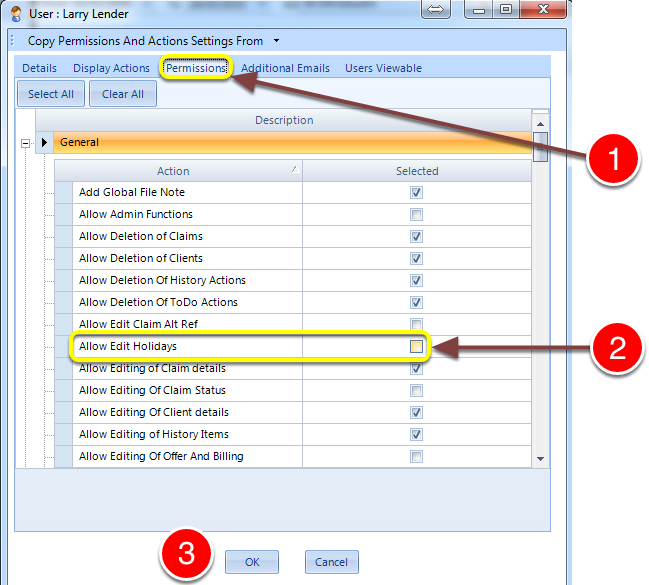
1: Click on the Permissions tab.
2: Tick the Allow Edit Holidays checkbox to allow the User to edit the Company's holidays.
3: Click OK to save the settings and close the window.
Open Holidays Window
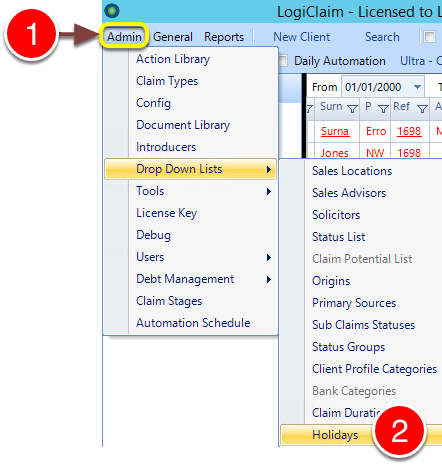
1: Click Admin in the menu.
2: Select Drop Down Lists > Holidays from the drop down menu - the Holidays window will open.
Set Holidays
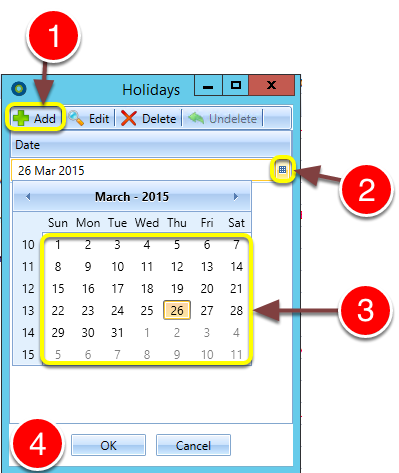
1: Click Add - a new entry will be added to the Holiday list.
2: Click the Calendar icon - a calendar will pop-out.
3: Select the the date.
4: Click OK to save and close the window.
Introduced in Version Number 2015.6.25.1669 on 25/06/2015