Unit Level Sale tab
A Sale tab has been added at the Unit level similar to the Sale tab at the Property level, with a few differences.
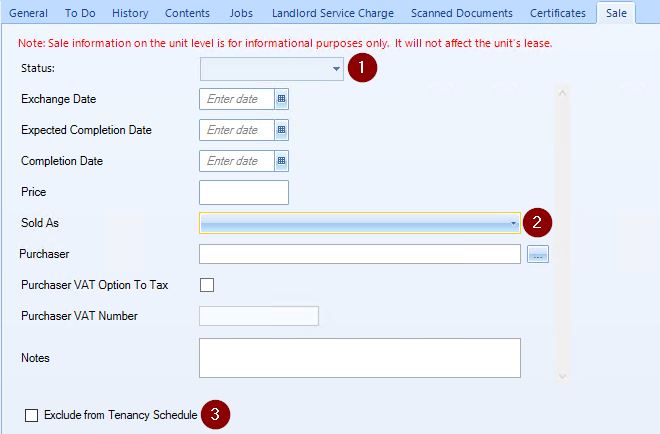
Differences between the Property's Sale tab and the new Unit's Sale tab:\ - The data in the Sale tab on the Unit level is informational ONLY and does not affect Leases etc.
- The Values section in the Property's Sold tab is not displayed on the Unit level.
- There is a new Sold As dropdown field.
- Status dropdown has three options for selection: Not Sold, Exchanged and Completed\
- When Not Sold is selected, it is not required to make a selection for Sold As field.\
- When either Exchanged or Completed are selected, Sold As field becomes mandatory.
- Sold As dropdown has two options for selection: Freehold and Leasehold\ Please Note that selecting either of these options will NOT cause anything to happen and is for information only.
- Selecting the Exclude from Tenancy Schedule tick-box will exclude this Unit from the Company Tenancy Schedule Report.
Note: Data entered in the Sale tab of a Property will propagate to the Unit level Sold tab.