How to Group the Tenancy Statement
Open a Tenant
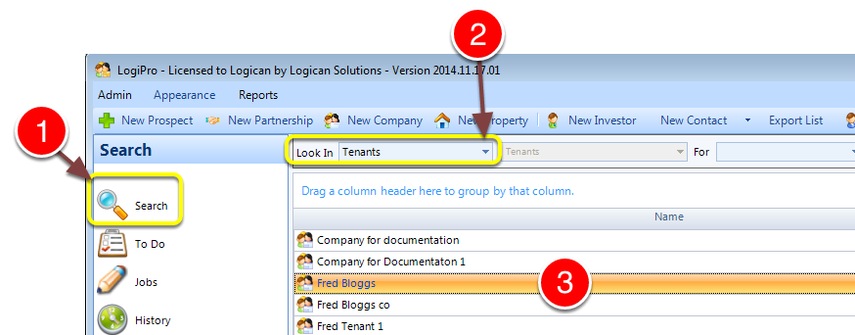
1: Click Search from the Side Menu - the search window will open.
2: Select Tenants from the drop down list - a list of Tenants will be displayed.
3: Open a Tenant by double clicking it - the Tenant window will open.
Open the Transactions tab
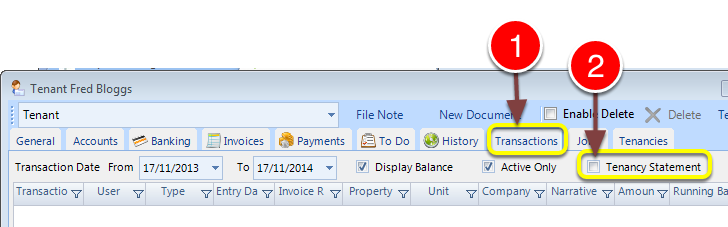
1: Click the Transaction tab - the Transactions window will open.
2: Click the Tenancy Statement check box - the Grouping toolbar will open.
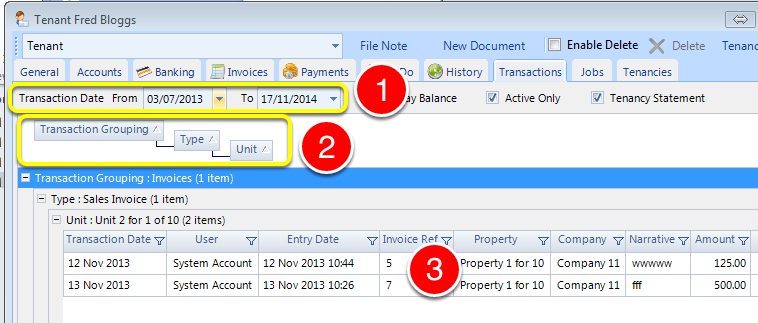
1: Select some dates - the data will be displayed.
2: Drag headers into the Grouping header section - the display will reformat as requested.
3: Transactions will be shown in the new groups and hierarchy as requested.