Creating the Nominal Account reporting Groups for CRC
Info
Setting up the CRC group nominal accounts
Setting Permissions for the Nominal Accounts reporting Groups.
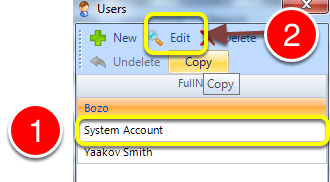
Set Admin>>Users
1. Select your user.
2, Click edit.
Setting the User Permission
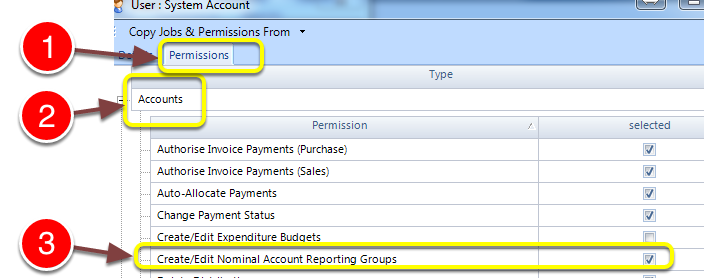
1. Click Permissions
2. Select Accounts
3. Check the Create/Edit Nominal Account Reporting Groups checkbox followed by ok.
Set the Nominal account reporting Groups
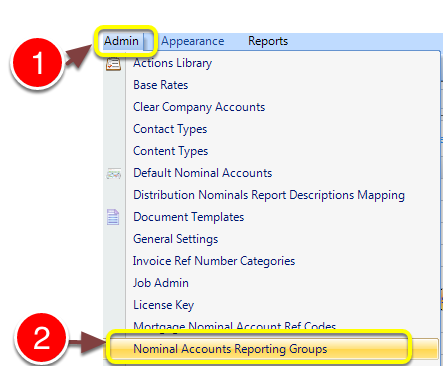
1. Go to Admin
2. Open the Nominal Accounts Reporting Groups
Setting the Nominal Accounts Reporting Groups
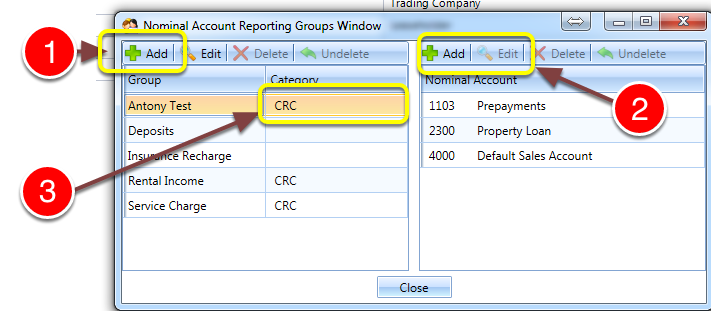
1, Click add to add a reporting group
2. Click add the add accounts to a group
3. Click edit select the category of the group.