Banking - Perform an Account Transfer
Info
LogiPro enables you to perform an account transfer between company bank accounts and between client accounts.
Company Bank Transfer
Click Search > Search In Companies, select a company and double-click the company to open it. The Company window displays.
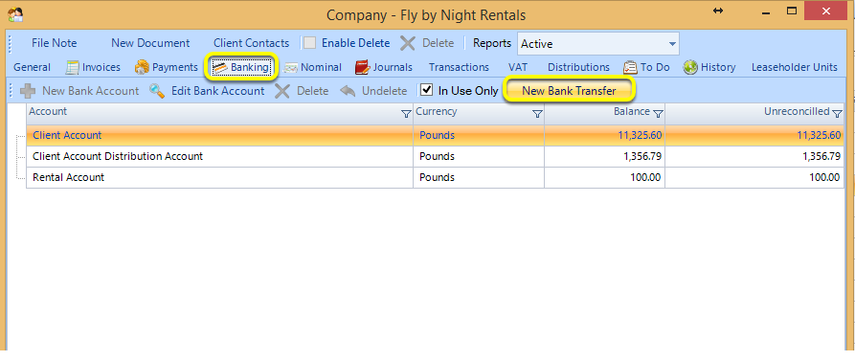
From the Banking tab, click New Bank Transfer. The Bank Transfer window displays.
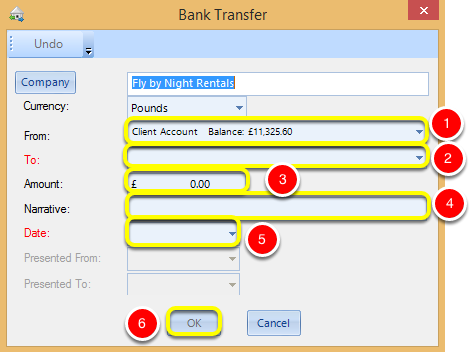
1. Select the From account.
2. Select the To account.
Note: All red labels indicate a field is mandatory.
3. Enter an Amount to transfer.
4. Enter a Narrative.
5. Select the Date of the transfer.
6. Click OK. The amount is transferred between accounts.
Client Account Transfer
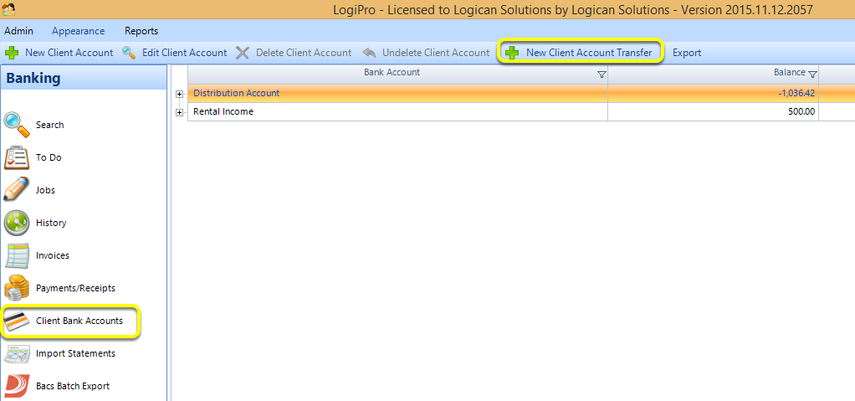
Click Client Bank Accounts > New Client Account Transfer. The Client Account Transfer window displays.
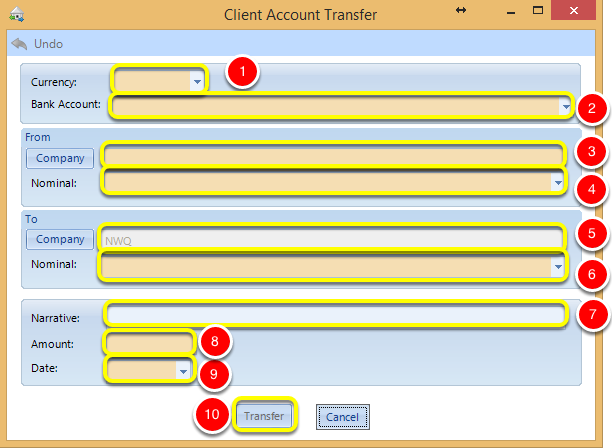
1. Select a Currency.
2. Select the Bank Account.
3. Select the From Company.
4. Select the From Nominal.
5. Select the To Company.
6. Select the To Nominal.
7. Enter a Narrative.
8. Enter the Amount to transfer.
9. Select the transfer Date.
10. Click Transfer. The amount is transferred between accounts.