How to set the text-box size and answer length in the Questionnaire
Open the Claim Types window
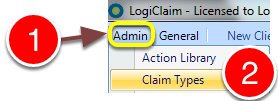
1: Click Admin from the menu.
2: Select Claim Types from the drop-down menu - the Claim Types window will open.
Edit the required Claim Type
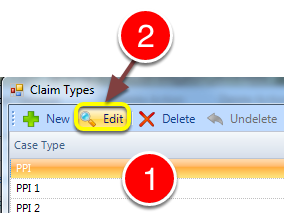
1: Click on the Claim Type required.
2: Click the Edit button - the Claim Type's window will open.
Select the required question
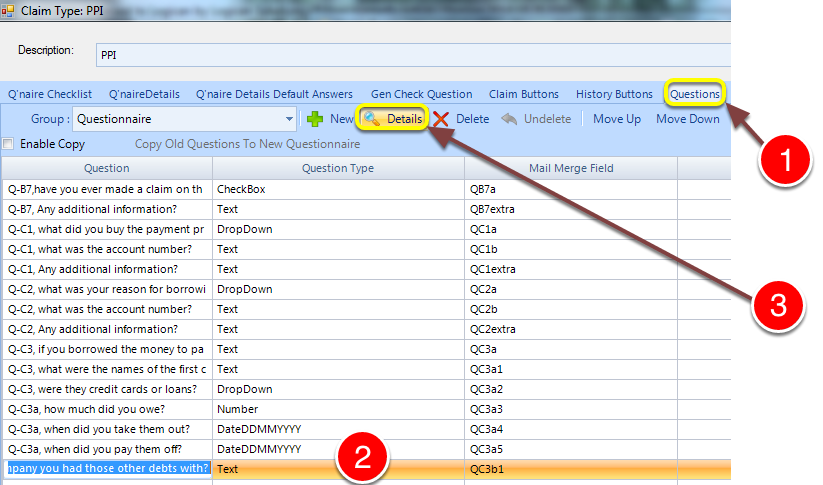
1: Click the Questions tab ( you will have to scroll right to see it).
2: Select the required question.
3: Click the Details button - the Question Details window will open.
Change the sizes
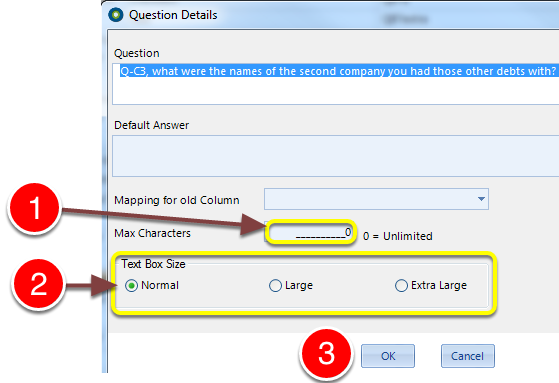
1: Enter an amount to limit the answer size, or leave at 0 to be unlimited.
2: Choose the answer's text box size.
3: Click OK to save and close the window.