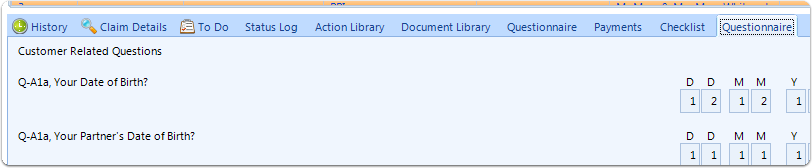
How to Add Labels to Questionnaire
For Claim Questionnaire Select Claim Types from the Admin menu
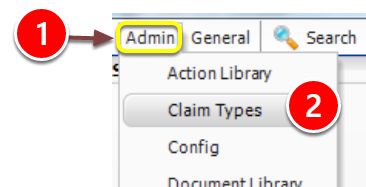
1: Click Admin from the Menu.
2: Select Claim Types from the drop down list - the Claim types window will open.
Select the Claim type
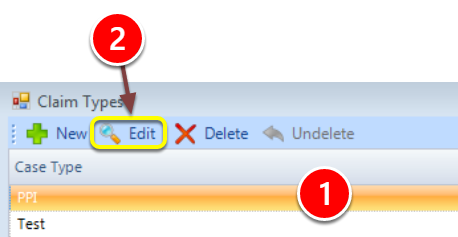
1: Select the required claim type.
2: Click Edit - the Edit Claim Type window will open.
Open the Questions tab
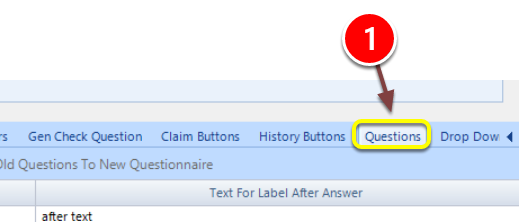
1: Click the questions tab - the Questions window will open.
Add a Label
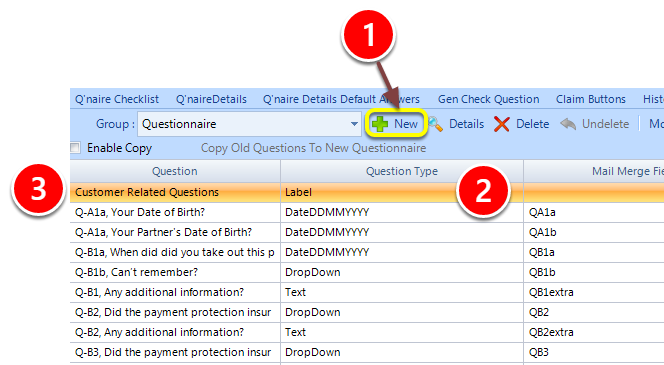
1: Click the New button to add a New Question.
2: Select Label from the Question Type drop down list.
3: Enter the label text in the Question field.
The label item is displayed as text in the questionnaire on the client window