How to Configure Claim Type Options
Open the Claim Types window
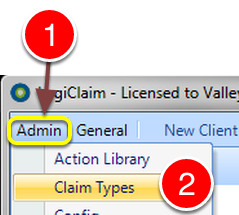
1: Click Admin from the Menu.
2: Select Claim Types from the drop down list - the Claim Types window will open.
Select a Claim Type
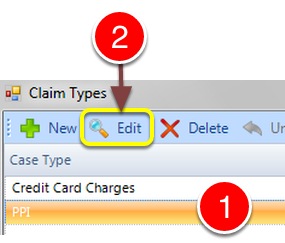
1: Select the required Claim Type.
2: Click Edit - the Edit Claim Type window will open.
Select the Claim Options tab
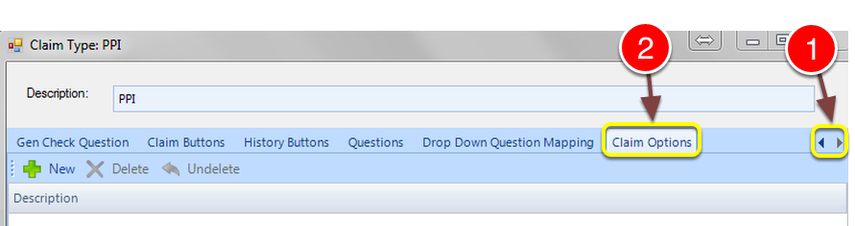
1: Use the direction keys to scroll through the tabs.
2: Click the Claim Options tab - the Claim Options window will open.
Create Options
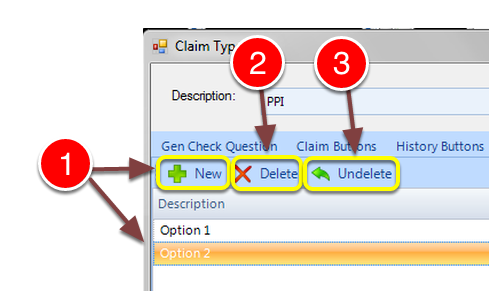
1: Click the New button to create a New entry. An empty line will be created. Type in the Option Description. Repeat this step for more options.
2: If Deletion of an Option is required. Select the Option and click Delete.
3: I an Option has been deleted in error. Click Undelete to restore it.
Claim Details
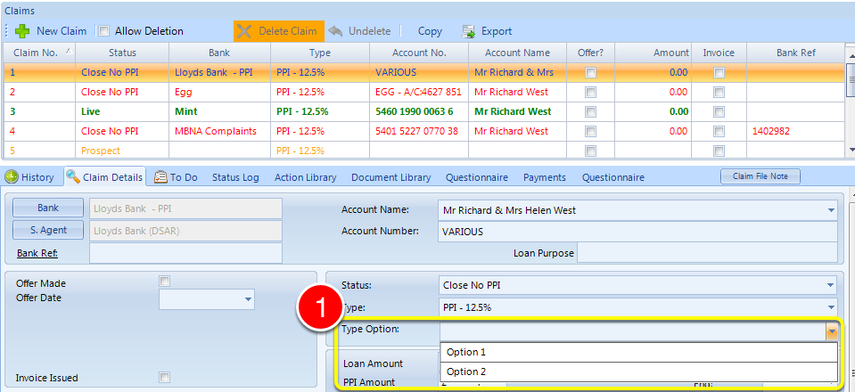
1: On the Claim Details screen there is a new drop down box to select the Claim Option.
NOTE: This will only show if the correct setting has been made in the Config. Click here for instruction.