How to Edit a contact balance
Open a Contact
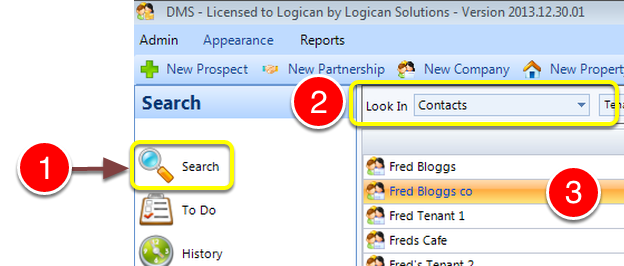
1: Click Search from the side menu - the Search window will open.
2: Select some search criteria - the list of contacts will open.
3: Double click the required contact - the Edit Contact window will open.
Select the Accounts tab
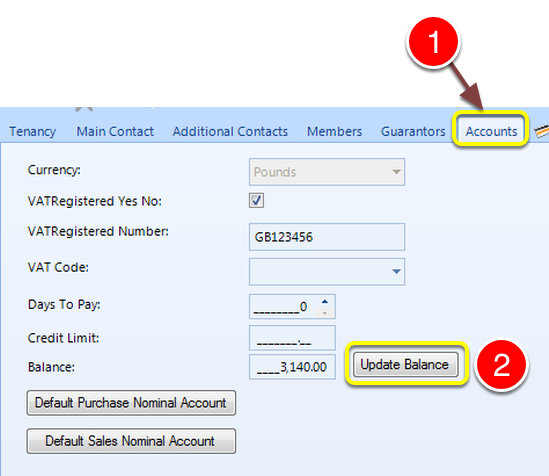
1: Click the Accounts tab - the Accounts window will open.
2: Click the Update Balance button - the Update Balance window will open.
Note: If the Update Balance button is disabled please change the User Permissions. Click here to see instruction.
Update the Balance
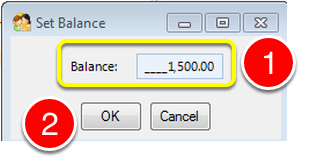
1: Type the new balance.
2: Click OK to Save the data and close the window.
Close the Contact window
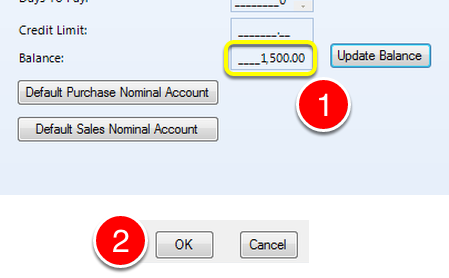
1: The new balance will now be displayed.
2: Click OK to close the window.