How to use the new style questionnaire mail merge fields
The questionnaire mail merge fields can be accessed when editing a document template
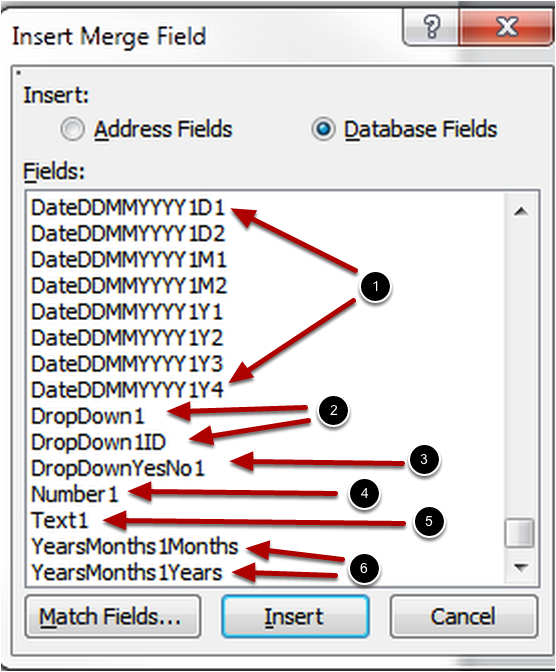
NOTE - The questionnaire fields are configured for each claim type
They are only visible when editing the template if it is associated with the appropriate claim type
Each type of question has different types of mailmerge fields
(1) DateDDMMYYYY questions have fields for each element of the answer D1,D2, M1,M2, Y1.Y2.Y3.Y4
(2) Drop down questions have fields both the text and ID value of the selected answer
(3) DropDownYesNo (and CheckBoxes) have a single field representing the value of the answer,
- 1 for Yes/Ticked
- 0 for No/Unticked
- blank for Unknown
(4) Number questions have a single field representing the value of the answer.
(5) Text questions have a single field representing the value of the answer.
(6)YearsMonths questions have fields for the months and years element of the answer