Adding Claim Questionnaires
Info
This feature allows users to create separate tabs in the claim window for a specific claim type.
Open the Claim Types Window
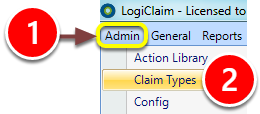
1: Click Admin in the menu.
2: Select Claim Types from the drop down menu - the Claim Types window will open.
Open the Claim Type Set Up Window
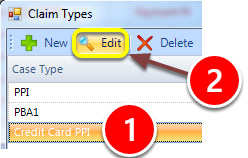
1: Select the required Claim Type.
2: Click Edit - the Claim Type's set up window will open.
Add a Questionnaire
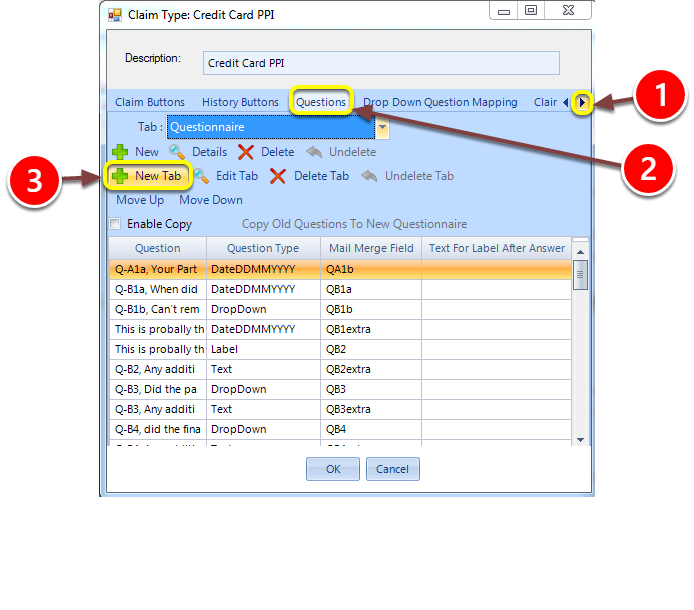
1: Scroll right until the Questions tab is visible.
2: Click on the Questions tab.
3: Click the New Tab button - a pop-out window will appear.
Set the Questionnaire's Name
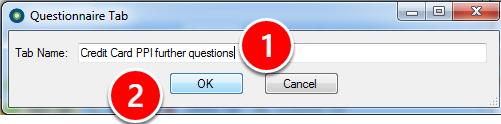
1: Type a name for the new questionnaire.
2: Click OK - you will now be ready to add questions.
Add Questions
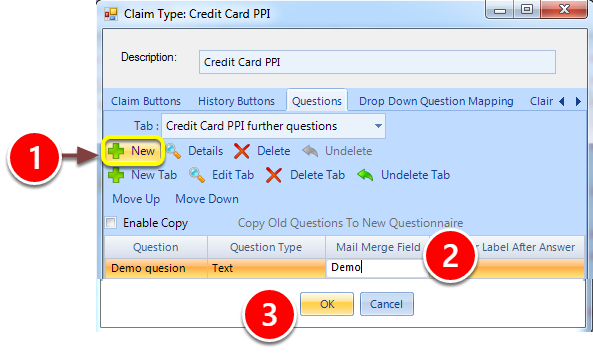
1: Click New - a new entry will be added to the questions list.
2: Enter the question's name, type and if required merge field name as required. Repeat for each required question.
3: Click OK to save the questionnaire and close the window.
PLEASE NOTE: Every new questionnaire will have new user permission created for it that will default to un-ticked. Follow here for instruction.
Introduced in Version Number 2015.6.25.1669 on 25/06/2015