Organizing the questionnaire tabs
Info
Multiple claim and client questionnaire tabs can be added, this article describes how to alter their order of display in the client window.
Open the Claim Types window
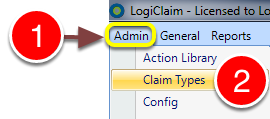
1: Click Admin in the window.
2: Select Claim Types from the drop-down menu.
Open the required claim type set-up window
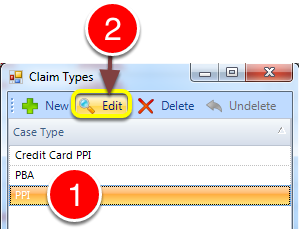
1: Select the required claim type.
2: Click Edit - the claim type's set-up window will open.
Alter the ordering
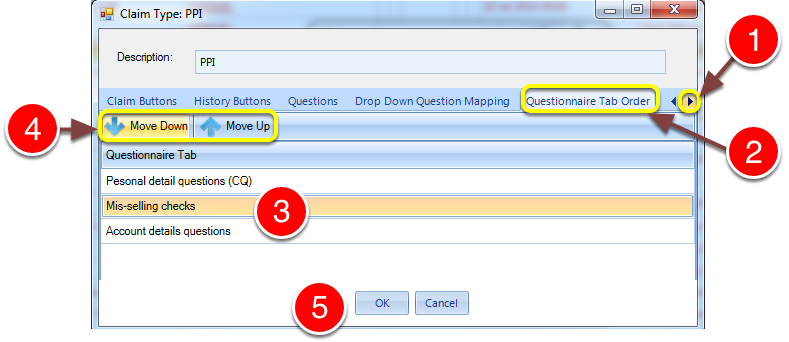
1: Scroll right until the Questionnaire Tab Order tab is visible.
2: Click on the Questionnaire Tab Order.
3: Select the tab to move. Client Questionnaire tabs are distinguished by '(CQ)' appended to the tab name.
4: Move it up or down the list.
5: Click OK to save and close the window.
The Client window
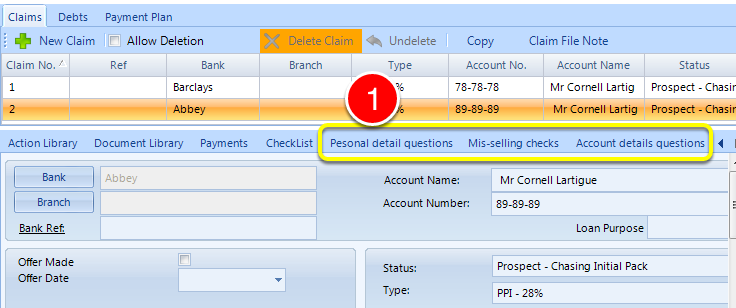
Introduced in version number 2015.8.7.1847 - 12/08/2015