Setting Questionnaire Permissions
Info
Each claim questionnaire or client questionnaire has a unique permission for users.
Open the Users Window
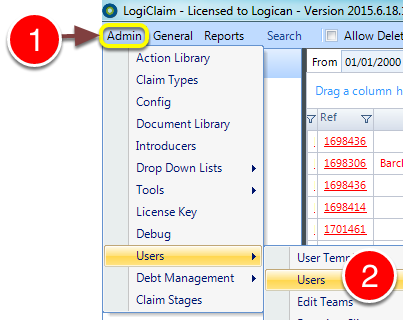
1: Click Admin in the menu.
2: Select Users > Users from the drop down menu - the Users window will open.
Open the User's window
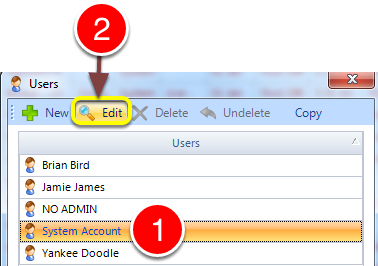
1: Select the required User.
2: Click Edit - the User's window will open.
Change the Permission
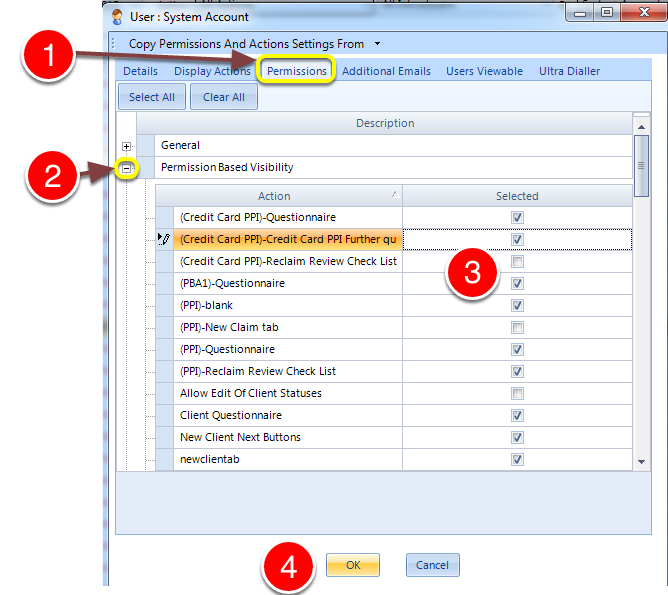
1: Click on the Permissions tab.
2: Expand the Permission Based Visibility section.
3: Tick or untick the required questionnaires.
4: Click OK to save the setting and close the window.
Introduced in Version Number 2015.6.25.1669 on 25/06/2015