How to delete custom action Claim Button in Client window - for a specific claim type

If you wish to remove the button from one or more users, but still want the button to exist for other users, you will need to change the permissions - See how to change permissions here.
If you wish to remove the button from everyone permanently - Please continue below.
Open Claim Types Window
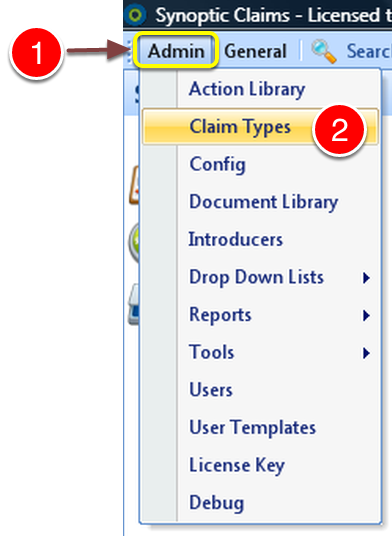
Open the Edit Claim Type Window
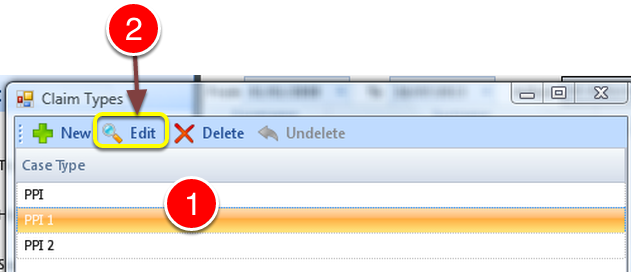
1: Select the required Claim Type.
2: Click Edit - the Edit Claim Type window will open.
Delete Button
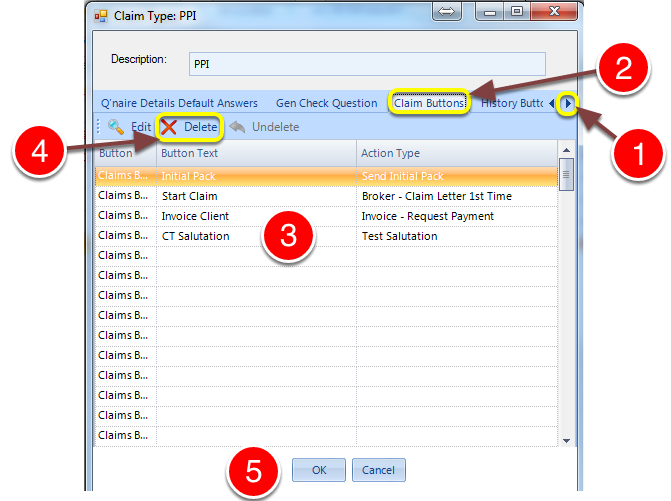
1: Scroll the menu bar using the arrow until the Claim Buttons button appears.
2: Click the Claim Buttons button - the Claim Buttons window will open.
3: Select the button for deletion.
4: Click Delete.
5: Click OK to permanently delete the button or click Cancel to ABORT the deletion.