Controlling a user's access to different parts of the program
Open the Users window
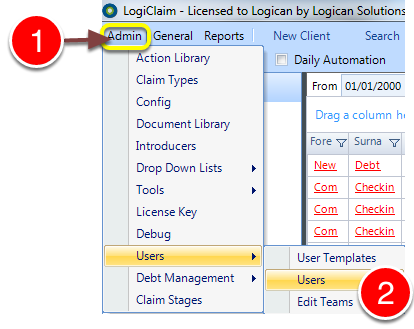
1: Click Admin from the Menu.
2: Select Users --> Users from the drop down menu - the Users window will open.
Select a User
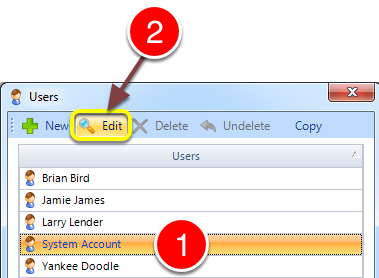
1: Select the required User.
2: Click Edit - the User's window will open.
Set up Users Permissions
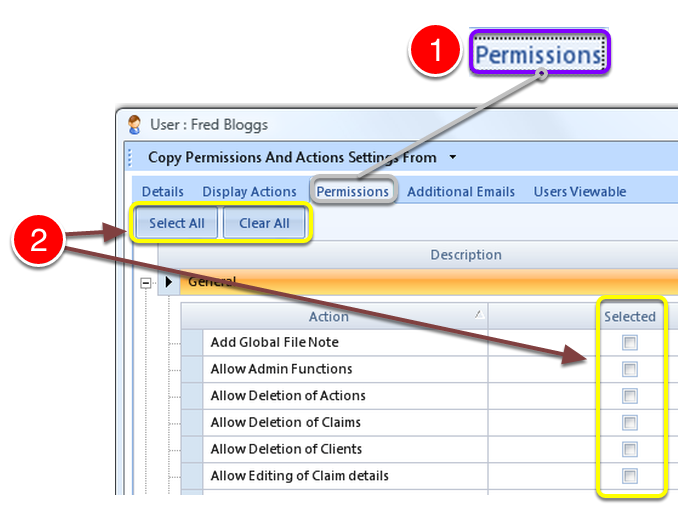
User Permissions authorise or block users from performing tasks or viewing information.
1: Select the Permissions tab - the User Permissions window will open.
2: You have 2 options. You can authorise this user to do everything by clicking the Select All button (Not recommended), or tick the check boxes to authorise or de-authorise individual actions.
Close the window
1: Click OK to save the changes and close the window.