How to add a User
Open the Users window
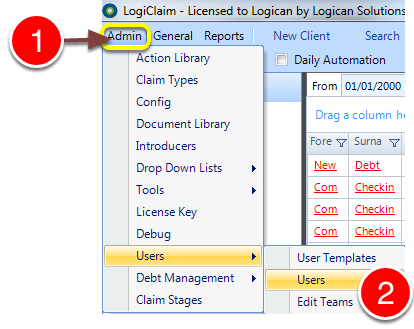
1: Click Admin from the Menu.
2: Select Users --> Users from the drop down menu - the Users window will open.
Add a User
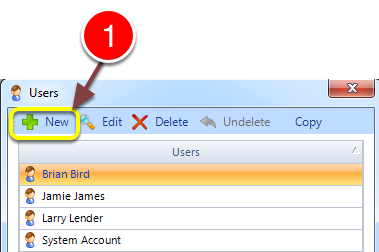
1: Click New on the Menu - the New User window will open.
Edit the User details
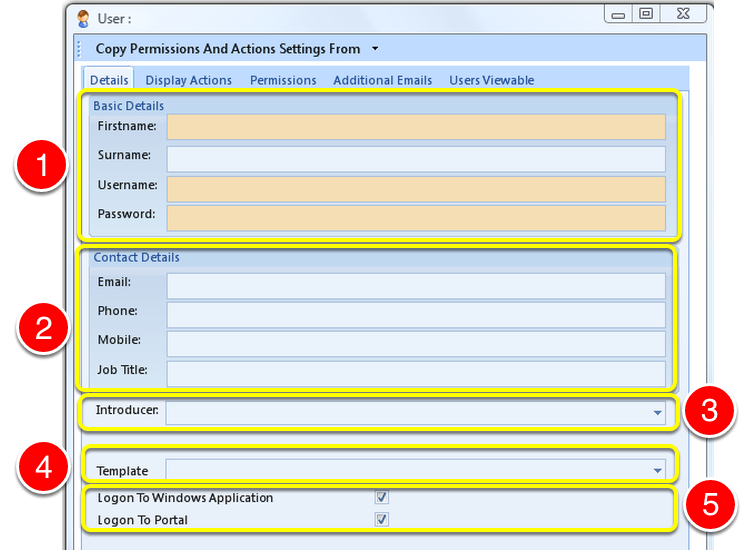
1: Complete the Basic Details - highlighted fields are mandatory.
2: If required key in Contact details.
3: If required select an Introducer from the drop down list.
4: If required Select a Template from the drop down list. Click here to see how to add a new Template to the list.
5: Select if this user can log into the Windows Application and/or the Web Portal.
NOTE
The Windows Application is the software that is installed on your computer or server.
The Web Portal is a version of the software found online but does not have 100% of the features available.
Close the window
1: Click OK to save the changes and close the window.