Charge Management Fees for the Property's Expenses
Info
There are two methods used to charge management fees as described here. The instructions below describe the procedure for each method separately for applying the management rate on purchase invoices raised and paid for an owner's property.
Open the Purchase Invoice window
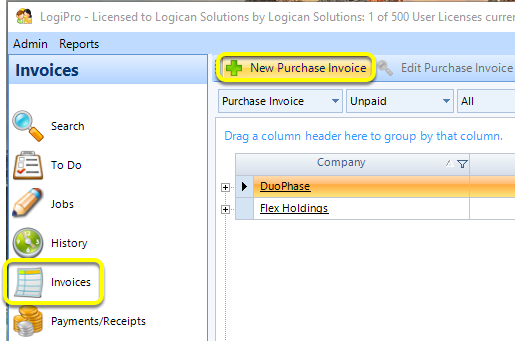
From the Invoices window, click New Purchase Invoice. The Purchase Invoice window displays.
Enter the invoice details
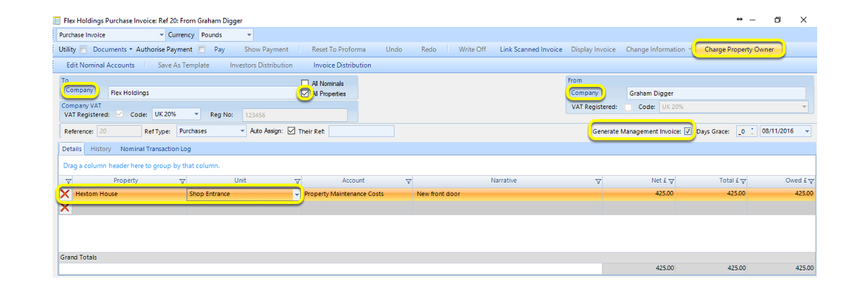
Click the To Company, select the managing company.
Click the From Company, select the invoice recipient.
Tick the All Properties checkbox
Select the property and unit and enter the other details.
Note: For users using the Purchase Invoice method, tick the Generate Management Invoice checkbox and post the invoice.\ \ For users using the Client Transfer method, click Charge Owner to open the Charge Property Owner window.
For Client Transfer method only - Apply the rate
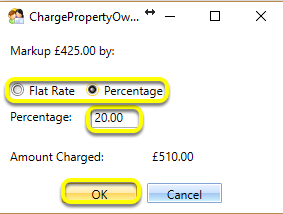
Select the Markup by Flat Rate or by Percentage.
In the Percentage field, enter the invoice markup amount.
Click OK to generate the invoice and trigger the client account transfer.