How to Change the Capitalisation of Merge Fields Manually
Info
Note: Certain aspects of the formatting can be set automatically. Click here for instruction.
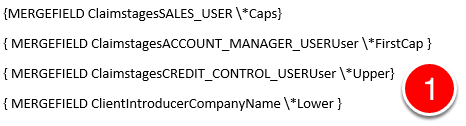
1: In the main document, press ALT+F9 to display field codes.
Then immediately following the name of the field (ADDRESSBLOCK, GREETINGLINE, or MERGEFIELD), type a space, and then type one of the following formatting switches:
\ Caps
Capitalizes the first letter of each word.
\ FirstCap
Capitalizes the first letter of the first word.
\ Upper
Capitalizes all letters.
\ Lower
Formats all letters as lowercase.
Then Press ALT+F9 again to hide field codes.