How to Delete a Client
Search for the Client
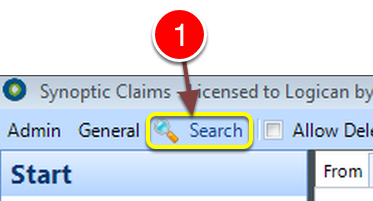
1: Click the Search button - the Search window will open.
Perform the Search
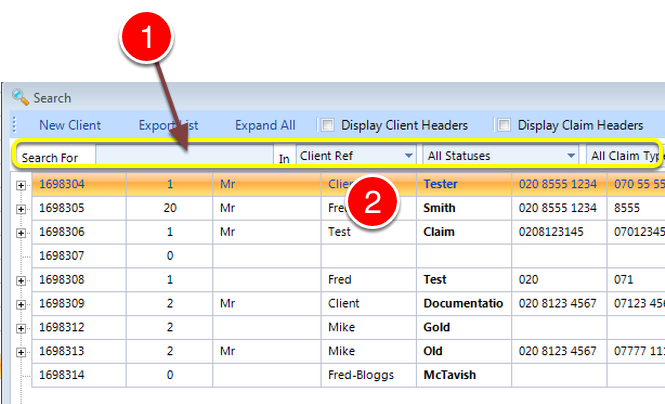
1: Key in some Search Criteria followed by Enter - or leave blank for all.
2: Double click a Client to select - the Client window will open.
Make the Delete button live
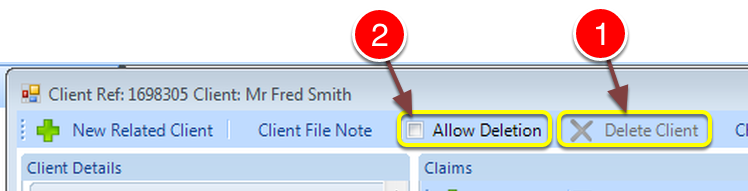
1: For safety and security reasons the Delete Client button is disabled.
2: To enable the Delete Client button, click the Allow Deletion check box.
Perform the Deletion
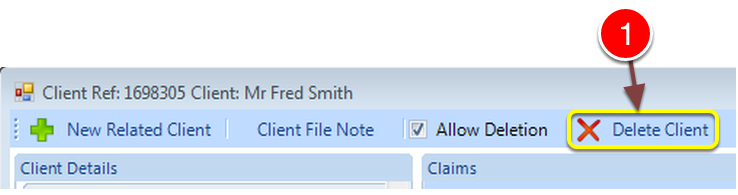
1: Click the Delete Client button - the window will close and the Client will be Deteted.
Note: If Deleted in error - the Client can be Undeleted. Click here for instructions.