How to Add, Change or Delete Claim Potential List to/from the drop down list
Open the Claim Potential List window
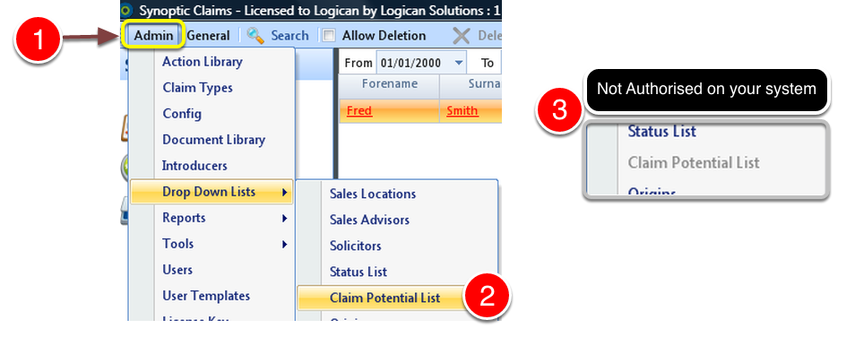
1: Select Admin from the Menu.
2: Select Claim Potential List from the drop down menu - The Claim Potential List window will open.
3: If greyed out, your system is not authorised to use this. To see how to change the authority click here.
Add a new Claim Potential
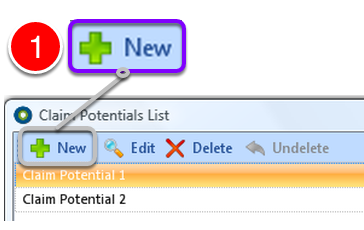
1: Click New from the Menu - the Claim Potential Details window will open.
Type description
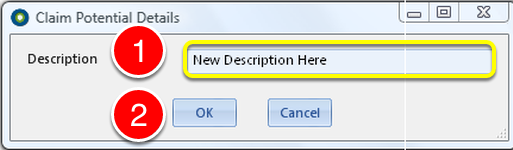
1: Type the Claim Potential description.
2: Click OK to SAVE and close the window.
Edit Claim Potential Details
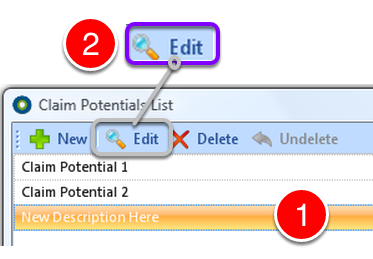
1: Click on item to Edit.
2: Click Edit from the Menu - the Claim Potential Details window will open.
Change the description
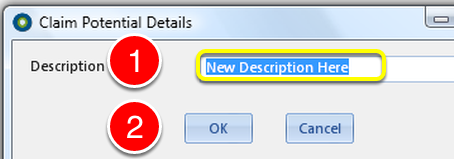
1: Type in the new description.
2: Click OK to SAVE the change and close the window.
Delete a Claim Potential
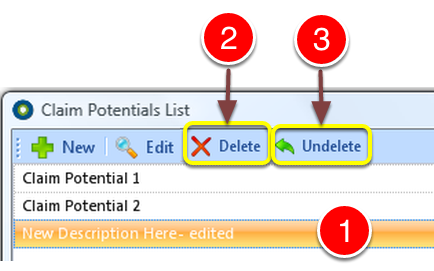
1: Click the Claim Potential that you wish to delete.
2: Click Delete to DELETE the Claim Potential.
3: If deleted in error click Undelete to ABORT the delete.
Close the window

1: Click OK to close the window.