How to Authorise a User to View Client Claim Stages Tab
Open the User window
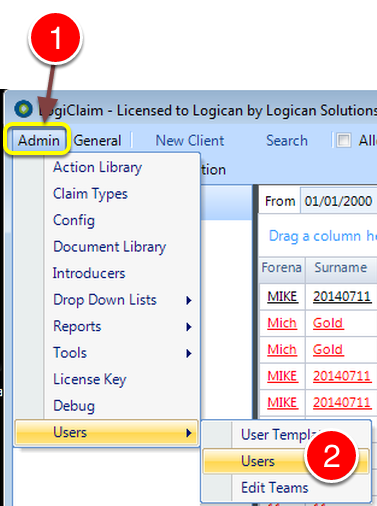
1: Click Admin from the Menu.
2: Select Users --> Users from the drop down list - the User window will open.
Select a User Account
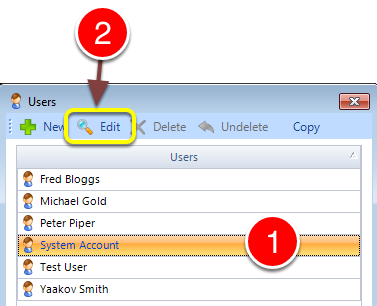
1: Select the User account to Edit.
2: Click Edit - the Edit User window will open.
Change the Permission
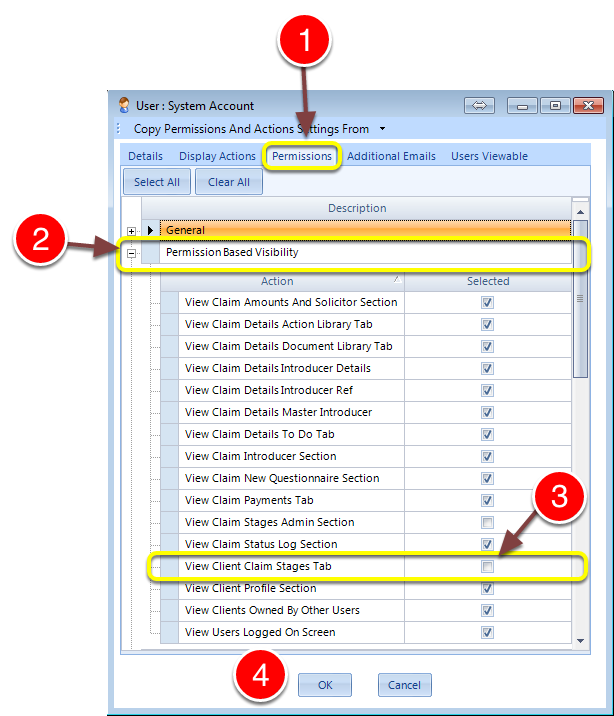
1: Select the Permissions tab - the Permissions window will open.
2: Expand the Permission Based Visibility list.
3: Tick the View Client Claim Stages Tab tick box to authorise the User.
4: Click OK to Save the data and close the window.