How to deactivate Links to Searches in Client Screen
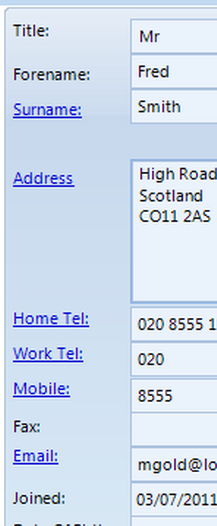
The hyper links shown above in the Client window can now be deactivated.
Open the User window
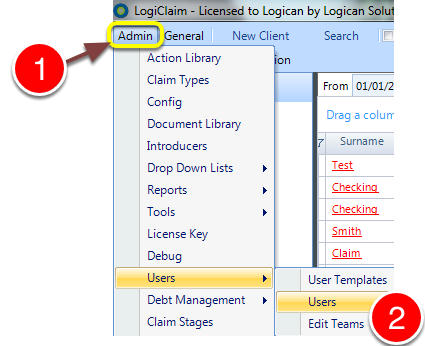
1: Click Admin from the Menu.
2: Select Users --> Users from the drop down list - the Users window will open.
Select the User
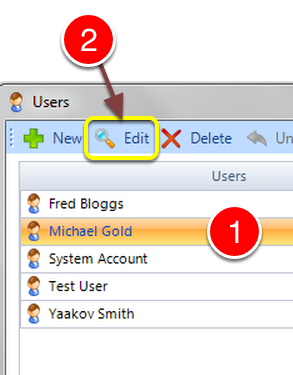
1: Select the User from the list.
2: Click Edit - the Edit User window will open.
Amend the Permission
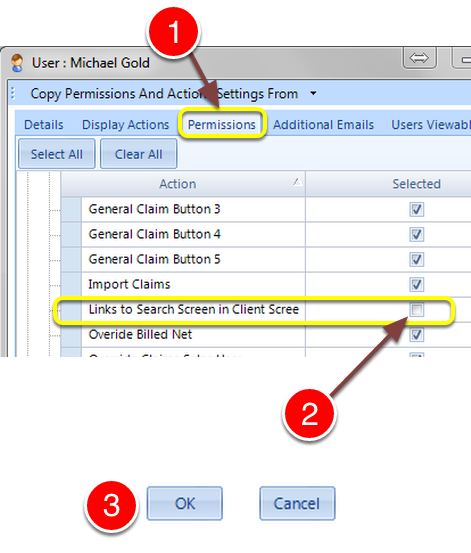
1: Click the Permissions tab - the Permissions window will open.
2: To deactivate the Searches, untick the Links to Search Screen in Client Screen or tick to activate.
3: Click OK to Save the changes and close the window.