How to Edit User Permissions
Info
User Permissions Authorise or Block users from performing tasks or viewing information.
Open the Users window
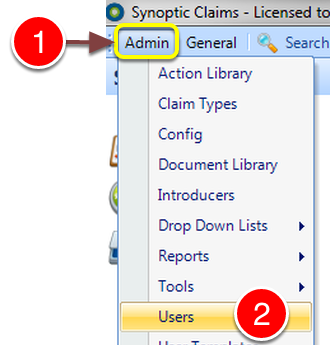
1: Click Admin from the Menu.
2: Select Users from the drop down list - the Users window will open.
Select the User to Edit
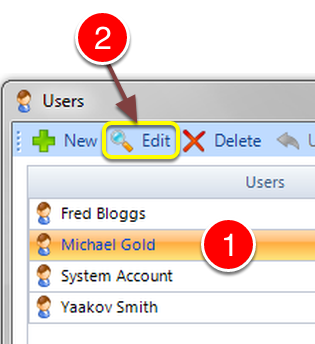
1: Select the User to Edit.
2: Click Edit from the Menu - the Edit user window will open.
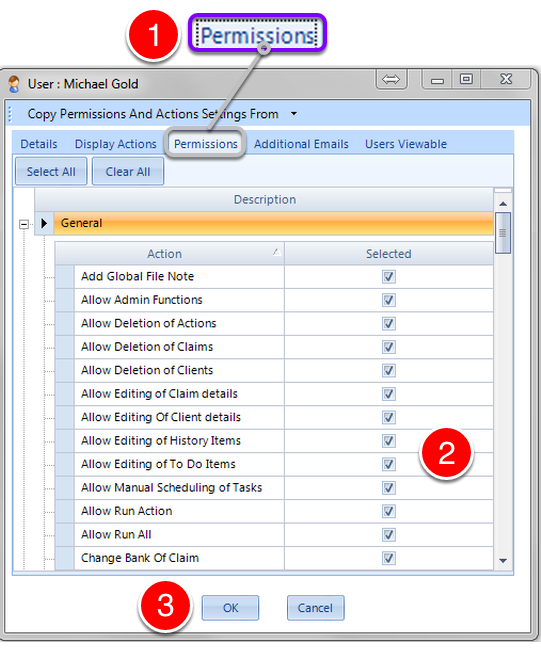
1: Click the Permissions tab - the Permissions window will open.
2: Edit the User Permissions by ticking to allow or unticking to disallow authority.
3: Click OK to Save the changes and close the window.
NOTE: The User will need to close CYC and Login again for the changes to take effect.