How to Copy the Permissions and Actions Settings from another User
Info
User Permissions Authorise or Block users from performing tasks or viewing information.
Open the Users window
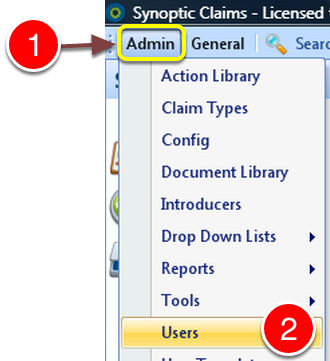
1: Click Admin from the Menu.
2: Select Users from the drop down menu - the Users window will open.
Select User to copy Permissions to
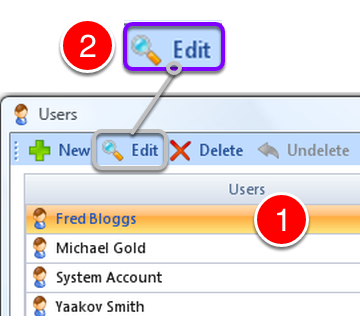
1: Select the user to copy the permissions to.
2: Click Edit - The Edit User window will open.
Open the Users drop down list
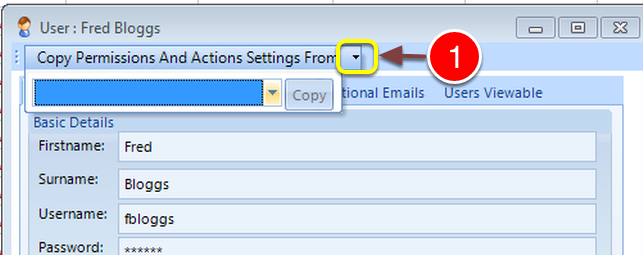
1: Click the Copy Permissions And Actions Settings From button - The Users drop down list will open.
Select a User to copy Permissions from
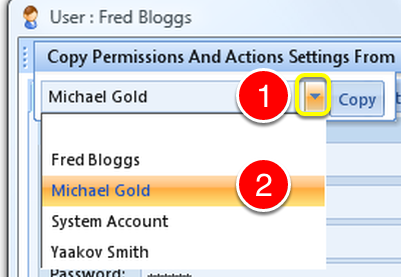
1: Click the button to open the drop down list.
2: Select the User to copy the Permissions from.
Perform the Copy
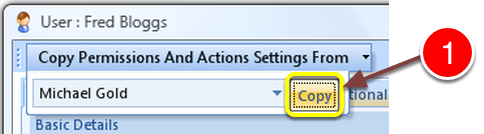
1: Click the copy button - the Permissions and Action Setting will be copied.
Close the window
1: Click OK to close the User window.